Written by Christopher Goodell, P.E., D.WRE | WEST Consultants Copyright © The RAS Solution 2014. All rights reserved. Critical depth is an important hydraulic parameter when evaluating hydraulic modeling results. As we know from our college hydraulics 101 class, water flowing at depths less than critical depth is supercritical and water flowing at depths greater than critical depth is subcritical. Supercritical flow is characterized by relatively shallow depths and high velocities. Subcritical flow is characterized by relatively deep depths and slower velocities. The forces dominating the movement of supercritical flow are inertial, while the forces dominating the movement of subcritical flow are gravitational. The flow regime (subcritical or supercritical) a particular cross section, or series of cross sections is in, can be determined by the Froude Number,

, where F = Froude Number, V = Velocity, g = gravitational constant, and d = depth. A Froude Number greater than 1 indicates supercritical flow, a Froude Number less than 1 indicates subcritical. A Froude Number = 1 is considered “critical” and possesses the minimum amount of specific energy (potential energy plus kinematic energy, per unit mass). This is considered an unstable condition in nature and is very rare. If you ever get a Froude Number = 1 in your results, most likely, there is a problem with the computations (i.e. in steady flow, RAS could not come up with a valid solution, so it defaults to critical depth). For those of you who have run steady flow HEC-RAS models, you know that there are three flow regime options for computing a steady flow run: subcritical, supercritical, and mixed flow (both sub and supercritical). If you select RAS to run in subcritical, and somewhere in your system RAS is not able to compute a valid subcritical answer, then it defaults to critical depth and moves on. If you select RAS to run in supercritical, and somewhere in your system RAS is not able to compute a valid supercritical answer, then it also defaults to critical depth and moves on. If you select mixed flow, RAS will compute both a subcritical and supercritical profile and anywhere there is a valid solution for both regimes, RAS will select the one that has the higher specific force value. If, in mixed flow, there are any cross sections that “default to critical depth”, that means there was a problem with RAS obtaining a solution. Usually, this means your cross section spacing is too far apart, you are in an area of rapidly varied flow (with not enough cross sections), or just bad input data. In unsteady flow, contrary to intuition, checking the “Mixed Flow” box in the unsteady flow analysis window does NOT tell RAS to evaluate both sub and supercritical solutions. This is done anyway in unsteady flow-whether “Mixed Flow Regime” is checked or not. Let me repeat: HEC-RAS can compute solutions in both subcritical and supercritical in unsteady flow regardless of whether “Mixed Flow Regime” is checked or not. Checking the “Mixed Flow Regime” box in the unsteady flow analysis window simply uses a stabilizing scheme for situations near critical depth and with large changes in velocity with respect to time (the local acceleration term in the St. Venant Equation). This is described further in
http://hecrasmodel.blogspot.com/2011/04/mixed-flow-regime-options-lpi-method.html. It’s very helpful to understand the solution you’ve obtained after running RAS by viewing the water surface profile plot with the “critical depth” variable turned on. This allows you to gage how close you are to critical depth, and more importantly, allows you to quickly evaluate if your solution has defaulted to critical depth anywhere, indicating a problem with the solution. The critical depth variable can be turned on in any of the graphical plots by selecting Options…Variables. Then check the box next to Critical Depth Elevation.

When you do this, RAS will plot critical depth, but ONLY at certain locations. Notice the plot from the Single Bridge HEC-RAS example data set. Critical depth (in red) is only plotted downstream of the bridge, and at a couple of cross sections upstream of the bridge. That is because RAS will only compute critical depth if your answer is supercritical, close to critical depth, or RAS is not able to come up with a valid solution (defaulting to critical depth) and at the boundaries.

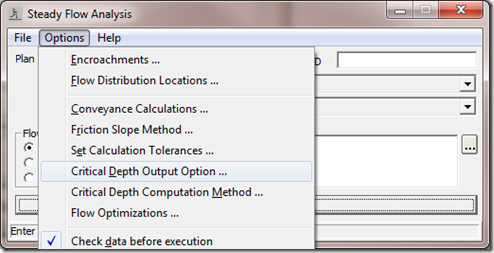
If you would like HEC-RAS to compute critical depth everywhere for you, go to the steady flow analysis window, and select Options…Critical Depth Output Option.

Then check the box next to “Critical Always Calculated.

 This will tell RAS to compute critical depth everywhere, and if you have the critical depth elevation variable turned on in your output plot, you’ll see critical depth plotted at every cross section.
  This will tell RAS to compute critical depth everywhere, and if you have the critical depth elevation variable turned on in your output plot, you’ll see critical depth plotted at every cross section.


