Pages

Showing posts with label Cross Sections. Show all posts

Thursday, September 17, 2015

Combining Two Reaches or Splitting One

Written by Christopher Goodell, P.E., D.WRE
Copyright © The RAS Solution 2015.  All rights reserved.

Suppose you have two separate HEC-RAS rivers and wish to combine them.  There is no “combine two rivers” option in HEC-RAS, but it can be done using the Move Points/Objects option.  Take the very simple reach presented below:

image

I wish to combine the Upper Tualatin with the Clackamas reach of the Willamette River.  In the figure above, they are disconnected-two separate rivers.  Select Edit…Move Points/Objects and

Monday, August 4, 2014

Exploring HEC-RAS: XS Interpolation Within a Reach-Part 2

Written by Christopher Goodell, P.E., D.WRE  |  WEST Consultants Copyright © The RAS Solution 2014.  All rights reserved.

The last post on XS interpolation gave an overview for reasons cross section interpolation may be necessary and a detailed description of Interpolation Option A:  “Within a Reach”.   http://hecrasmodel.blogspot.com/2014/05/exploring-hec-ras-xs-interpolation.html
This post will cover Option B:  “Between 2 XS’s”.  Between 2 XS’s simply means HEC-RAS will interpolate cross sections ONLY between two selected “non-interpolated” cross sections.  It will not interpolate over a reach.  Obviously the disadvantage here is that you have to interpolate between pairs of cross sections one-at-a-time, which could prove to be  a long exercise for a large model.  However, Option B has a huge advantage over Option A, in that you are able to control how interpolation is done, by drawing your own connecting Master Chords.  More on that in a bit.  First, to initiate interpolation with Option B, go to the Geometric Data window and select Tools…XS Interpolation…Between 2 XS’s…
image


When Option B is selected, the following window will open:

Monday, July 28, 2014

Deleting Portions of HEC-RAS Cross Sections Quickly

Written by Chuck Davis, P.E., CFM  |  WEST Consultants
Copyright © The RAS Solution 2014.  All rights reserved.  


Ahead of the wide-scale implementation of the 2-dimensional (2-D) modeling module in HEC-RAS, I wanted to share a quick tip that will be useful for editing your 1-dimensional (1-D) HEC-RAS model to prepare to couple your 1-D channel with a 2-D overbank area. It’s common to have a cross section with a well-defined channel and a wide, shallow floodplain in the overbank adjacent to the channel. This can be seen in the figure below. As can be seen from this figure, flow in the channel (between the bank stations denoted by the red dots) will have to reach a stage of approximately ten feet before spilling into the left overbank.

Figure1

Wednesday, May 7, 2014

Cross Section Points Filter

Written by Christopher Goodell, P.E., D.WRE  |  WEST Consultants

Copyright © The RAS Solution 2014.  All rights reserved.

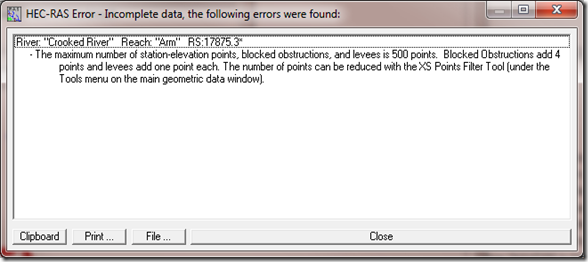
As RAS model development is done more and more through GIS, using the HEC-GeoRAS extension, cross section point filtering is becoming a standard part of the HEC-RAS model development exercise.  It’s not too uncommon for a model created in GIS to have multiple hundreds of cross section station elevation points.  This is normally not a problem, as long as you don’t exceed 500 points (the maximum allowed for any cross section in HEC-RAS.  However, do an interpolation with bounding cross sections that have more than 255 points each, and you will have interpolated sections with more than 500 points.  Try to run that model and HEC-RAS will give you a message like this:
image

Fortunately, this is easily remedied.  Simply use the Cross Section Points Filter tool located in the Tools menu item in the Geometry schematic:

image

In this tool, you can filter a single cross section, or do multiple cross sections together.  For a single cross section, either go to the cross section indicated in the error message, or scroll through the river station dropdown box until you find one with more than 500 points.

image

Once you’ve selected your cross section(s), you have a number of different ways to filter.  Near and Colinear filtering will remove points that are either very close to another point, or that are in line with other points.  You just provide the tolerances (tell RAS how close is too close, etc.) . Once you enter the tolerance values, press the “Filter Points on Selected XS”, and check to see if you removed enough points to get below 500.  If not, you’ll have to tighten your tolerances.  This can take a little bit of trial and error as you figure out what tolerance levels will remove enough points. 

My preferred method for filtering is to use the “Minimum Area Change” method.

image

Here, all you do is enter in the desired number of cross section points you wish to have in the cross section (500 or less), and then HEC-RAS will remove points until it gets to that number.  No trial and error necessary.  BUT, you do not have control on which points are removed.  HEC-RAS uses a built-in scheme to remove points while minimizing the change in cross section area.  At first I was a bit reluctant to use this feature, thinking that it might drastically alter the shape of my cross section.  However, when comparing the original and filtered cross sections, I’ve never noticed a visual difference.  The “minimum area change” scheme that is used by HEC-RAS does a very good job at preserving the shape and hydraulic characteristics.  Give it a try next time you need to filter. 

Thursday, August 15, 2013

Careful with Flow Inconsistency on the Max WS Profile

Written by Chris Goodell | WEST Consultants
Copyright © RASModel.com. 2013.  All rights reserved.

I’m a big proponent of checking flow consistency in your results.  Anyone who has taken a RAS class from me has heard me go on about Standard Table 2 and the benefits of maintaining a consistent distribution of flow not only between sub sections (left overbank, main channel, right overbank) in a cross section, but from cross section to cross section.  Any significant change in flow, or flow distribution should be questioned and explained.  Generally there is a problem with ineffective flow definitions, Manning’s n values, bank station placement, or your model is simply unstable (for an unsteady flow model). 
image
After running an unsteady flow model, and you open up the profile output table (also called summary output table), the first profile that pops up is the Max WS profile.  Now, you have to be careful when checking flow distribution with the Max WS profile.  Although it shows up in the plot and tables along with all of the other profiles, the Max WS profile is not a real profile.  It never happened.  It is actually a compilation of all of the highest water surface elevations that happened during the simulation for each cross section-regardless of time.  A “Greatest Hits” of water surface elevations, if you will.  This is exactly what you would plot when producing a maximum inundation map. 
image
For many models, the Max WS profile will do just fine in identifying flow distribution problems with an important exception – reaches that have significant lateral inflows whose peak flows do not line up temporally with the main channel peak flow.  If that lateral inflow sets up a backwater in the main channel, prior to the arrival of the flood in the main channel, it could actually produce a higher peak water surface elevation than the elevation that corresponds to the peak of the main channel flood. 
Here’s an example from a question I recently got from a former attendee of one of my RAS courses.  Warning, this gets a bit detailed and specific-make sure you’re wide awake before reading on… 
Question:  “I’m currently working on an unsteady model where I have my initial flow hydrograph and then two lateral inflow hydrograph’s further downstream.  My question is that at my first lateral inflow hydrograph location the next couple of cross-sections upstream of the inflow point have greatly reduced peak flows.  For instance, the peak flow of the hydrograph entering the upstream end of the reach is around 646 cfs and at the cross-sections just upstream of the lateral inflow that number is reduced down to around 387 cfs.  There is not a drastic change in cross-section shape or stream slope in the area of the lateral inflow.  Have you run across this type of thing before?  Is this realistic or is something in the model not quite right?  Any thoughts would be greatly appreciated.”
Response:  What looks like an inconsistency, really is not.  In fact your results look great.  When checking flow consistency, be careful doing this with the MaxWS profile in the summary output table.  This is where you saw the drop from 646.61 cfs to 387.53 cfs from RS 3936.90 to RS 3899.86.  The problem with checking flow consistency on the MaxWS profile is that the maximum water surface does not necessarily correspond to the maximum flow, especially if you are in a backwater area like below.  This backwater is set up by the lateral inflow entered just downstream at RS 3726.34 and happens prior to the arrival of the peak flow in the main channel.  A very common occurrence when modeling a flood in large systems with multiple tributaries.  clip_image001 The peak of the lateral inflow at 3726 happens at 1250 hrs on the 13th.  This sets up a backwater that produces the max ws elevation of 976.52 ft for RS 3899.86.  However, the flow at RS 3899.86 at this moment is only 389.13 cfs.  The peak flow in the main channel has not arrived yet.  clip_image002 The peak flow in the main channel at RS 3899.86 happens after the lateral inflow peak by about 1 hour and 10 minutes.  At 1400 hrs, the backwater effect from the lateral inflow is almost completely gone at RS 3899.86 and the peak flow is 647.59 cfs with a corresponding ws elevation of 976.25 ft.  clip_image003 clip_image004 As a result, what you see in the max ws profile is not the max flow at RS 3899.86, but the flow that is happening during the max ws elevation.  You can see all of this by checking around the stage and flow hydrographs. If you see inconsistencies like this for the max ws profile, you can verify your results are still good by scanning through each individual real profile in the summary output table (cumbersome), or go to the dss file and open up the max flow profile like so: clip_image006 This gives you a plot like this: clip_image008 Notice that the max flow at 3899.86 is indeed in the 650-ish range, which is where it should be.  The big changes in max flow are where you have your lateral inflow hydrographs. 


Tuesday, March 26, 2013

Extending your Cross Sections to High Ground?

Copyright © RASModel.com. 2013.  All rights reserved.

What are the implications of having a cross section that is too short and doesn't extend all the way out to the highest computed water surface elevation?  Does it affect the results?  Take this cross section for example. It is missing much of the left overbank (presumably).


Image courtesy of Adam Bohnoff

First of all, when RAS encounters this situation, it will automatically extend the last station elevation point vertically to the height of the computed water surface.  This adds a so-called "vertical wall" to the end of the cross section.  Additional wetted perimeter will be included for water that comes into contact with the "vertical wall". 

So what does this mean?  Well, you will be missing out on wetted area-possibly a LOT of wetted area.  Maybe it's negligible.  It's up to you to decide.  For typical rivers, the added wetted perimeter associated with the "vertical wall" will not make much of a difference in the results.  If you plan on mapping the computed flood plain in RAS Mapper, or in GIS using the GeoRAS extension, you'll miss out on some areas that should be shown as inundated. 

I see a few possible scenarios that you would need to consider.  Your course of action will depend on whether your model is steady or unsteady, and how much error you're willing to accept at this location:

1.  The missing wetted area is actually very small.  Either the maximum water surface elevation just exceeds the end point or perhaps there is a bluff just to the left of the first station elevation point that would contain all of the water.  In this case, you probably don't waste time getting additional survey data and leave the cross section as is, or you manually approximate in a station elevation point to capture the bluff. 

2.  There is considerable flow area that is missing, but it is so far out in the overbank or it's in a flow separation area and it can all be considered ineffective.  In a steady flow model, you can probably leave this as is.  Ineffective flow area is ignored in steady flow computations.  The answer will be slightly different if you extended the cross section and put in an ineffective flow trigger.  This is strictly due to the difference in quantified wetted perimeter.  For typical rivers, where the width is much greater than the depth, this will make little difference in your results.  For unsteady flow, there could potentially be a huge error in the results if you leave the cross section as is.  In unsteady flow modeling, ineffective flow areas are accounted for as hydraulic storage in HEC-RAS.  Hydraulic storage will attenuate the flood wave as it progresses through a system.  Omitting available storage can significantly affect both the propagation and attenuation of your flood wave.  I strongly recommend extending the cross section to high ground in this case. 

For steady flow, the differences in RAS will be very slight between these two options, limited to the wetted perimeter computed added at the vertical wall (ineffective flow assumes a frictionless boundary). In unsteady flow, these two options could produce VERY different results. 

3.  There is considerable flow area that is missing, and it is actively conveying flow.  In this case, steady, or unsteady, you'll want to extend the cross section to high ground.  Omitting this portion of your cross section will have a direct impact on the computed water surface elevation.  The degree to which depends on how much of the cross section area you are omitting, but it could be quite significant. 

So...how do we extend the cross sections?  In a perfect world, you'd have your survey crew go out and get you more points.  Unfortunately this cost money and takes time, frequently both of which you don't have an excess of when doing a hydraulic model study.  If your RAS geometry is already set up in GIS and your terrain model extends far enough laterally, you could simply extend the cross section cut line to the high ground and reimport into RAS.  Easy! 


However, if you do not have a georeferenced model and you can't get your survey crew out to the field in a timely (and cost-effective) manner, you can always approximate the extension of your cross sections using a USGS topo map. 

These "Quad" maps can be found for free on-line for any location in the US.  In fact, there are similar topography data sets for just about the entire world-available on-line for free.  The downside is that their resolution is quite inadequte for typical river modeling, and they don't include bathymetry (underwater topography).  However, for the purposes of extending your cross section to high ground, this can be an acceptable alternative to a physical survey. 

Simply find and download a terrain map that covers your area of concern.  Locate your existing cross section line on that map.  Then extend it to high ground, marking the locations where your cross section line crosses contour lines. Note the elevations, and the relative distances between contours, then manually enter that data as new station elevation points. 

Tuesday, July 31, 2012

How to draw cross sections.

Written by Chris Goodell, P.E., D. WRE
Copyright © RASModel.com. 2012. All rights reserved.

Cross sections must be perpendicular to the flow lines at all locations.  And they cannot intersect with each other.  That is why it is common to see cross sections snap at different angles outside the main channel (we call this doglegging).  The trick is to keep them from intersecting, while also staying perpendicular to flow lines.  In the figure below, the dark blue line represents the main channel.  The brown lines represent the edge of the flood plain.  The light blue lines are my impression of the flow lines through this terrain, if water were flowing appreciably in the floodplain.  The green lines are cross sections.  Notice that the cross sections are drawn so that they are not only perpendicular to the main channel, but also to my perception of the flow lines in the floodplain.  It can be very helpful to draw these flow lines before cutting cross sections. 
clip_image002
It takes a little bit of practice to do this correctly, and most of the time some trial and error, but as long as you remain perpendicular to the flow lines and don’t intersect, you’ll have a good set of cross sections. 
Where it can get tricky is at a junction.  The following RAS Bloggery article will help with junctions.  http://hecrasmodel.blogspot.com/2009/02/how-to-best-model-junction.html

Tuesday, January 19, 2010

Another Reason for Interpolated Cross Sections

Written by Chris Goodell, P.E., D. WRE | WEST Consultants
Copyright © RASModel.com. 2010. All rights reserved.

Here’s a classic case for interpolation of cross sections in a RAS model.

image

Notice the drop in water surface to near critical depth at the grade break. Then, at the next cross section upstream of the break, RAS seems to overestimate the head loss. Sometimes this phenomenon can be much more dramatic, occasionally initiating oscillations upstream of the break that can lead to instabilities.

When scanning the results of your model run, or when trying to diagnose sources of instability, keep an eye out for this phenomenon. Interpolation of cross sections around this point will provide a much more accurate and stable answer. Notice in the figure below, that further interpolation upstream of the newly interpolated reach is probably warranted.

image