
Written by Christopher Goodell, P.E., D.WRE | WEST Consultants Copyright © The RAS Solution 2014. All rights reserved.
The last post on XS interpolation gave an overview for reasons cross section interpolation may be necessary and a detailed description of Interpolation Option A: “Within a Reach”. http://hecrasmodel.blogspot.com/2014/05/exploring-hec-ras-xs-interpolation.html
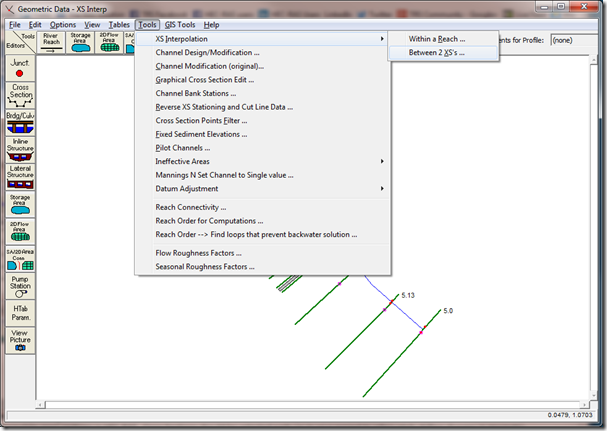
This post will cover Option B: “Between 2 XS’s”. Between 2 XS’s simply means HEC-RAS will interpolate cross sections ONLY between two selected “non-interpolated” cross sections. It will not interpolate over a reach. Obviously the disadvantage here is that you have to interpolate between pairs of cross sections one-at-a-time, which could prove to be a long exercise for a large model. However, Option B has a huge advantage over Option A, in that you are able to control how interpolation is done, by drawing your own connecting Master Chords. More on that in a bit. First, to initiate interpolation with Option B, go to the Geometric Data window and select Tools…XS Interpolation…Between 2 XS’s…
When Option B is selected, the following window will open:
The last post on XS interpolation gave an overview for reasons cross section interpolation may be necessary and a detailed description of Interpolation Option A: “Within a Reach”. http://hecrasmodel.blogspot.com/2014/05/exploring-hec-ras-xs-interpolation.html
This post will cover Option B: “Between 2 XS’s”. Between 2 XS’s simply means HEC-RAS will interpolate cross sections ONLY between two selected “non-interpolated” cross sections. It will not interpolate over a reach. Obviously the disadvantage here is that you have to interpolate between pairs of cross sections one-at-a-time, which could prove to be a long exercise for a large model. However, Option B has a huge advantage over Option A, in that you are able to control how interpolation is done, by drawing your own connecting Master Chords. More on that in a bit. First, to initiate interpolation with Option B, go to the Geometric Data window and select Tools…XS Interpolation…Between 2 XS’s…

When Option B is selected, the following window will open:

