Pages

Wednesday, December 16, 2015

The Advanced Hydrologic Prediction Service for Chehalis Washington

A great example of where flood inundation maps and accessible flood warning systems can help a community prepare for floods.


Contact:               Brent Bower                                                                      FOR IMMEDIATE RELEASE 
206-526-6095 x228                                                           December 15, 2015
                               
Flood Inundation Maps to Enhance Flood Forecasts for the Chehalis River

People living along the Chehalis River have a new tool from the National Weather Service to help them understand their risk during floods. A large section of the river is now depicted on flood maps that show people where the water will flow and what it will look like in their community when the river crests beyond its banks. The new flood inundation maps will also help local officials reduce flood impacts to communities by giving them more advanced information for planning.

Monday, December 14, 2015

HEC-RAS 5.0 versus TUFLOW versus MIKE21 – HEC’s official response

In case you haven’t seen it, there has been a very popular LinkedIn discussion on the Hydraulic/Hydrologic Modeler’s Forum debating the advantages, disadvantages, and merits of HEC-RAS 5.0, TUFLOW, and DHI’s MIKE21.  There was a lot of great information (and some misinformation) and insight provided in that thread.  It is well worth the read.  Some of the misinformation was directed at the beta version of HEC-RAS Version 5.0.  Enough that HEC decided to publish a response to clear up any confusion.  
At play is a result of HEC-RAS’s 2D solution scheme using the full shallow water equation where for highly dynamic events where flows severely contract, using too small of a time step could lead to a divergence from the true solution, rather than a convergence.  This is not an issue when a computation interval is selected within the guidance presented by HEC in their user’s manual.  While HEC disagrees that this is a necessarily a “problem” with its software, as some on the discussion claim,  HEC has elected to make this a non-issue by “improving the portion of the full shallow water equation formulation, such that user’s will be able to use very small time steps without the results changing significantly.”   I’ve included HEC’s response, written by Gary W. Brunner, to the LinkedIn discussion below, but I highly recommend you read the LinkedIn discussion first by clicking here
I’m posting this not just to allow HEC to reach a larger audience with their rebuttal, but also because there is a LOT of great information in this document about how HEC-RAS 2D works and how we, as HEC-RAS 2D modelers should use it.  Please enjoy!  A downloadable pdf is available here.
The following text is copyrighted by the Hydrologic Engineering Center and Gary W. Brunner:


Tuesday, December 8, 2015

Pressure and Weir Flow

Here’s a video of pressure and weir flow yesterday at a bridge near my house.  This was brought on by some very intense rainfall over a short period of time.  What do you think the weir coefficient would be?


‘Tis the season in many parts of the world for heavy rains and high water.  This is a good reminder to always try to get out and view your rivers and streams when they are flooding.  There is nothing like a first-hand view of a flood to understand how water interacts around our infrastructure.  This is invaluable information for setting up and calibrating your HEC-RAS models. 

Thursday, October 29, 2015

Breaking the HEC-RAS Code – 1 Year!

Well it’s been one year since I published “Breaking the HEC-RAS Code”.  It was a lot of work, but I am very pleased to see how many people are making use of the book controlling and automating HEC-RAS with their own codes.


For those of you who haven’t discovered it yet, this book introduces the HECRASController, an API that gives you the ability to control HEC-RAS from an external application.  If you have HEC-RAS installed on your computer, you already have the HECRASController!  The book is written around Visual Basic for Applications (VBA), since most HEC-RAS users have Excel and many are already at least somewhat familiar with the VBA programming language embedded within.  However, many readers of my book have expanded the concepts presented to other programming codes like Python, R, C#, Matlab, etc with great success. 

“Breaking the HEC-RAS Code” unlocks the secrets to using the HECRASController.  If you would like more information about this book, or the companion Excel workbook that contains code written for every HECRASController procedure plus example code for a variety of applications, follow the link below or shoot me an email. 

Breaking the HEC-RAS Code

For those of you already making use of the HECRASController, let me suggest visiting The RAS Solution forum and posting examples and/or questions about your experience to the HECRAS Controller sub-forum.  Good luck breaking the HEC-RAS code!

Friday, October 9, 2015

Wednesday, September 30, 2015

Transect for Extracting Flow in a 2D Area

Written by Christopher Goodell, P.E., D.WRE  |  WEST Consultants
Copyright © The RAS Solution 2015.  All rights reserved.

*Update:  Version 5.0.2 now does flow transects in RAS Mapper with profile lines.  No longer necessary to use a 2D Area Connection to do this.

A very common output request in 2D modeling is for flow over (through) a transect line.  HEC-RAS 5.0 does not have a specific tool for extracting flow data along a line in a 2D area, however it CAN be done.  Here’s how you do it.
Inside your 2D area, draw a 2D Area Connection where you would like to extract flow.  In the figure below, I’ve drawn my 2D Area Connection line from bottom to top, which represents left to right, looking in the downstream direction. 
image
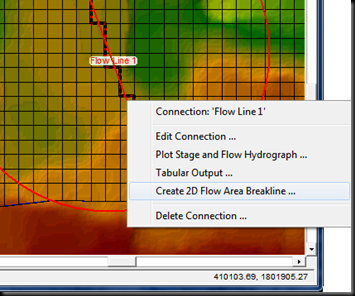
Notice that with the completely orthogonal cell orientation, but with a skewed 2D Area Connection line, the black and red striped connection line is “jagged”, following cell faces between the connecting cells.   To fix this, we need to use a breakline.  You could draw a break line on top of the 2D Area Connection (click the 2D Area Break Lines button on the top of the Geometric Data window), however, HEC-RAS also has a short cut for putting breaklines on 2D Area Connections.  If you right click on the 2D Area Connection (I’ve named if “Flow Line”), you’ll see an option to “Create 2D Flow Area Breakline”.  Select this for quick cell re-orientation around the 2D Area Connection Line.
image
image
Now you’re ready to enter data to the 2D Area Connection that you’ll use for extracting flow.  Click the SA/2D Area Conn button on the left side of the Geometric Data window. 
Make sure you connect “From” and “To” to the same 2D flow area.  Then choose “Normal 2D Equation Domain”.  This will force RAS to use the same 2D St. Venant equations over the terrain under the 2D Connection line as if the connection line wasn’t there.  BUT…you still have to define the Structure Type as a Weir and provide station-elevation data to define the crest of the weir, even though RAS will not use it.  Maybe this gets fixed in a later version.  HEC makes this easy though as you can extract the terrain profile from the 2D Connection cutline by clicking the button “Terrain Profile” as shown below.  Just copy and paste the terrain profile into your station-elevation table and you will  have defined a “zero-height” weir.  I guess it’s possible to use any crest definition, since RAS shouldn’t use the weir equation-it will use the normal 2D equation domain, but I haven’t tried it. 
image
Now you are ready to compute.  After computing, go to the Stage and Flow Hydrographs output window.
image
Make sure you select Type…Storage Area Connections (yes, it is technically an SA/2D Area Connection, but HEC hasn’t gotten around to renaming this yet in this window).  Now you can see the flow hydrograph for the flow line you’ve drawn.  You can check, but you’ll see the results are exactly the same as before including the flow line.

image

Monday, September 28, 2015

New Beta Version of HEC-RAS 5.0

Fellow HEC-RAS users:

A new beta version of HEC-RAS (August 21, 2015 build-"Release Candidate 2") is now available to download and install.  I have no new information about  when the final release will be made available, but for now this new beta version has a lot of bugs fixed and many new features, including breaklines, Manning’s n value regions, and mapping of sloped water surfaces in RAS Mapper for 2D areas.  Please follow the directions from HEC below for downloading and installing.

Enclosed is a link to a new HEC-RAS 5.0 version, Release Candidate 2, August 2015.  We have fixed several Bugs since the Release Candidate 1 version.  This version has all the features we have planned for the final release.  We are in a No New Features mode, and performing the final testing and documentation updates.

     Here is the link:

https://drive.google.com/file/d/0B0bpiyLiUeRXVEZyVWJVd0FNNUk/view?usp=sharing

     This self extracting exe should be run in a separate directory.  Once it is run, there will be a new Setup package for the HEC-RAS 5.0 beta software; a new 2D User’s Manual in PDF format; and a new set of 2D example data sets in a zip file.  You must have admin privileges to run and install the software using the setup package.  Please Uninstall the previous HEC-RAS 5.0 beta first!!!!

     Thank you for installing and testing this final Beta version of the software.

Some of the New Stuff:

1. Lateral Structures can now be Georeferenced.  So it will be easier to lay them out, and get them connected to 1D river reaches and 2D Flow Areas.
2. HEC-RAS Mapper, now uses a TIN based sloping water surface technique to show spatial results inside of RAS Mapper. Previous versions, in 2D area the depth, velocity, etc.. was plotted as a single value for the entire cell, which produced some blocky looking plots in steep terrain.
3. More flexible internal hydraulic structures.
4. Improvements to the stability of connecting 1D reaches into and out of 2D flow areas.
5. Several New output capabilities in RAS Mapper – please see the 2D user’s manual.
6. Many Bug fixes, especially in RAS Mapper.